Mark data outside a specified value or range.
To mark invalid data
- Enter data in the worksheet as below.
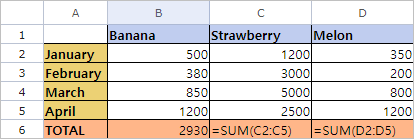
- Set the range of integers to limit from B2 to B5.
In this example, set “300” for Minimum and “1000” for Maximum. - Select the data range from B2 to B5, and then click Data-Data Validation-Data Validation.
- Check if incorrect data values are marked as below.
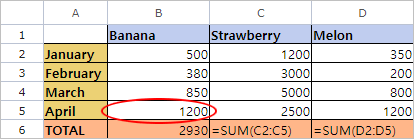
- Modify the values as needed.
Was this article helpful?
That’s Great!
Thank you for your feedback
Sorry! We couldn't be helpful
Thank you for your feedback
Feedback sent
We appreciate your effort and will try to fix the article