You can conveniently perform the frequently used functions.
Find Max Value
- Click the cell where the max value will be returned.
- Click Formula-AutoSum-Max.
- Specify the cell range in '=MAX()' to perform the function.
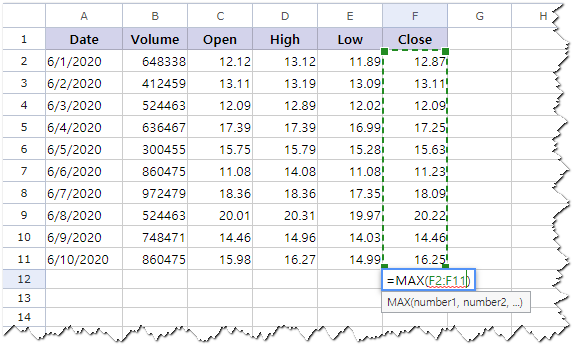
- Press <Enter>.
Submenu of AutoSum
| Menu | Description |
|---|---|
| Sum | Get the sum of the selected range. |
| Average | Get the average of the selected range. |
| Count | Get the count of the selected range. |
| Max | Get the max of the selected range. |
| Min | Get the min of the selected range. |
| More Functions | Select more functions in the Function dialogue box and get the value. |
Was this article helpful?
That’s Great!
Thank you for your feedback
Sorry! We couldn't be helpful
Thank you for your feedback
Feedback sent
We appreciate your effort and will try to fix the article