Adds more rows/columns or deletes rows/columns from the existing table.
Add rows/columns to a table
- Position the mouse pointer on a cell where you want to add rows/columns.
- Click Add a Row Above, Add a Row Below, Add a Column to the Right, or Add a Column to the Left icon on the Table task pane.
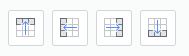
- Repeat the steps above as many rows/columns as you want to add.
Delete rows/columns from a table
- Position the mouse pointer on a cell where you want to delete rows/columns.
- Click the Delete Rows or Delete Columns icon on the Table task pane.

- Repeat the steps above as many rows/columns as you want to delete.
Delete a table
- Place the pointer any cell of the table you want to delete.
- Click the Delete Table icon in the Table task pane.

Was this article helpful?
That’s Great!
Thank you for your feedback
Sorry! We couldn't be helpful
Thank you for your feedback
Feedback sent
We appreciate your effort and will try to fix the article