Style Bar groups icons for frequently used formatting-related commands in once place to run those commands with only one action.
More Information
Icon | Name | Description |
| Undo | Undo the action previously taken while editing the document. |
| Redo | Redo commands or actions canceled by Undo. |
| Style | Specify the style to use. |
| Font | Specify the font to use. |
| Font Size | Enlarge or reduce the text size. Adjusting the font size changes both horizontal and vertical values at the same time. |
| Bold | Display the selected text in bold. |
| Italic | Display the selected text in italic. |
| Underline | Underline the selected text. |
| Strikethrough | Draw a strikethrough on the selected text. |
| Font Color | Change the color of the selected font. |
| Text Highlight Color | Highlight text with the selected highlight color. |
| Superscript | Make text superscript. |
| Subscript | Make text subscript. |
| Character Spacing | Adjust the spacing between characters. |
| Align Left | Align paragraphs to the left margin. |
| Align Center | Align paragraphs to the center. |
| Align Right | Align paragraphs to the right margin. |
| Justify | Align paragraphs to both left and right margins. |
| Bullets | Add bullets to the head of the paragraph when multiple items are listed. |
| Numbering | Add numbers to the head of the paragraph when multiple items are listed. |
| Multilevel List | Add various level of list to the head of the paragraph when multiple items are listed. |
| Outdent | Decrease the left margin of the current paragraph. |
| Indent | Increase the left margin of the current paragraph. |
| Line Spacing | Change the line spacing of the active paragraph. |
| Add Space before Paragraph | Add the space before the current paragraph to increase the spacing. |
| Add Space after Paragraph | Add the space after the current paragraph to increase the spacing. |










Note
Color Palette
The color palette allows you to specify any color you want.
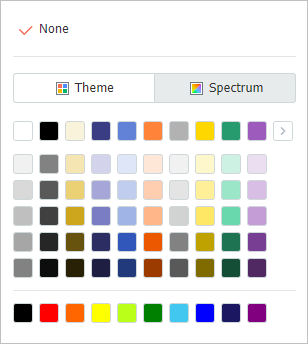
- Theme Color
A color that is a combination of several colors that match a specific theme and is provided as a group is called a theme color. When you click the arrow icon on the Theme Colors tab, several predefined theme colors are listed.
- Spectrum
You can select the desired color from the gradient color spectrum or enter the color code to directly specify a color.
Was this article helpful?
That’s Great!
Thank you for your feedback
Sorry! We couldn't be helpful
Thank you for your feedback
Feedback sent
We appreciate your effort and will try to fix the article