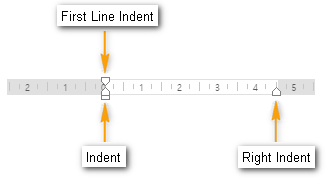
Shows the width of the page as well as the indentation of the paragraph.
Showing the ruler allows you to easily set the paragraph indentations, margins and/or tabs. You can show or hide the ruler.
Show horizontal ruler
To show the ruler on the top of the edit screen:
- Click View-Document Window-Ruler.
More Information
The ruler contains indetation marks. You can adjust left/right indentations by dragging their marks on the ruler.
Was this article helpful?
That’s Great!
Thank you for your feedback
Sorry! We couldn't be helpful
Thank you for your feedback
Feedback sent
We appreciate your effort and will try to fix the article