This document explains how to install ThinkfreeOffice in a 3DS Kubernetes environment. The 3DS exclusive version and the standard version have the following differences.
- An ODF filter for editing ODF file formats is included.
- 3DS exclusive fonts are included.
Install ThinkfreeOffice
The overall installation method is the existing method described on this guide article. .
If you change the version tag to add *-3ds, you can install the 3DS exclusive version.
VERSION="17.0.0-3ds"
All other methods are the same as the existing guide.
Enable ODF filter
Currently, ODF is included in the 3DS exclusive Thinkfree Office product suite but the feature must be enabled. You can enable the ODF filter through the following process .
- Open a browser and access the ThinkfreeOffice administrator page.
- 'Setting' → 'Additional setting'
- Click 'Add a row' and enter a value into the newly created row.
- Enter 'useODFExternalFilter' in the 'key' column.
- Click the magnifying glass button.
- Select 'False' for the 'value' column.
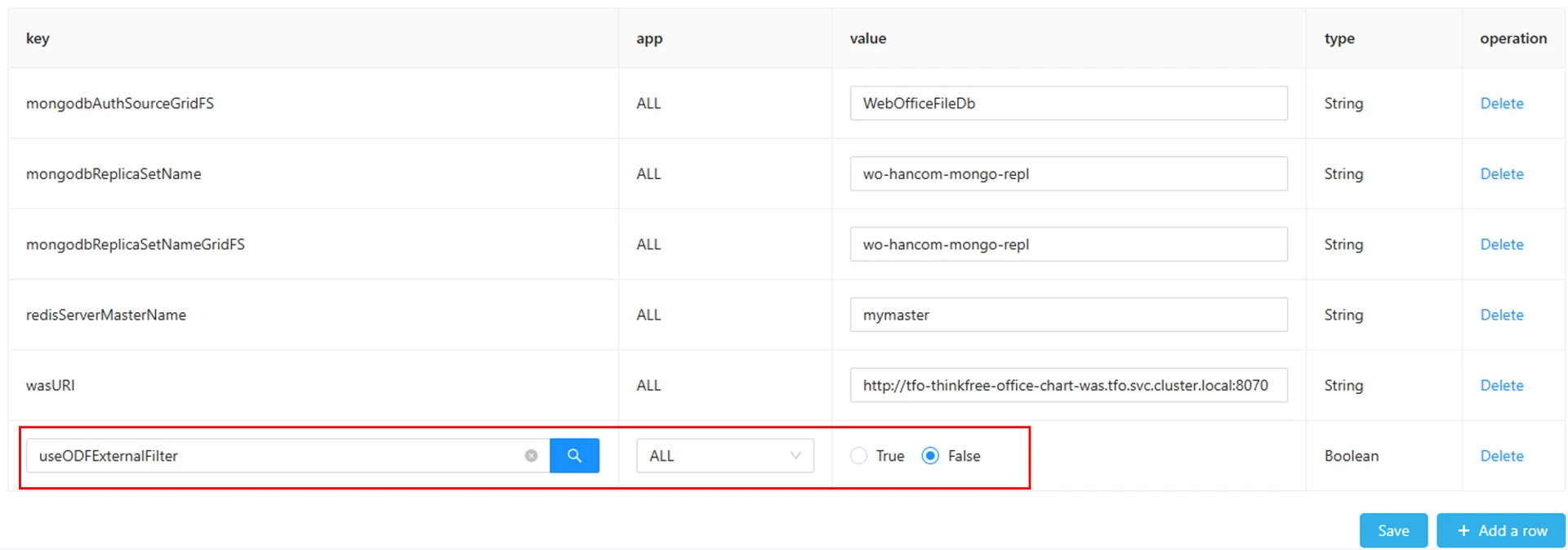
- Click the 'Save' button.
Was this article helpful?
That’s Great!
Thank you for your feedback
Sorry! We couldn't be helpful
Thank you for your feedback
Feedback sent
We appreciate your effort and will try to fix the article